
If you're preparing for the Cisco Certified Network Associate exam, the single most useful thing you can do before opening a single textbook is understand the CCNA 200-301 syllabus and how Cisco weights each section. Not every topic on the blueprint is worth the same number of marks - and candidates who study in domain order instead of weightage order routinely run out of time before reaching the highest-scoring material.
This guide breaks down the complete CCNA 200-301 syllabus for 2026: all six official domains, what each one actually tests, and exactly how much of your final score it controls. Whether you're mapping out a self-study plan or evaluating a CCNA course, this is the blueprint your preparation should be built around.
CCNA 200-301 Exam at a Glance
Before getting into the domains, here's the exam structure you're preparing for:
- Exam code: 200-301
- Current blueprint version: v1.1 (effective since August 2024, valid through February 2, 2027)
- Duration: 120 minutes
- Number of questions: Approximately 100–120
- Question formats: Multiple-choice, multiple-select, drag-and-drop, simulations, and simlets (simulated lab scenarios)
- Certification validity: 3 years
- Prerequisites: None - CCNA is Cisco's entry-level associate certification
Cisco doesn't publish an exact passing score, but the exam engine selects questions proportionally from each domain based on its official weightage - which is exactly why understanding that weightage matters more than memorizing the blueprint in numerical order.
The 6 CCNA 200-301 Domains and Their Exam Weightage
Here is the complete domain breakdown as per Cisco's official v1.1 blueprint:
|
Domain |
Weightage |
What It Covers |
|
1. Network Fundamentals |
20% |
Networking basics, OSI/TCP-IP models, IP addressing, cabling |
|
2. Network Access |
20% |
VLANs, trunking, STP, EtherChannel, wireless |
|
3. IP Connectivity |
25% |
Routing, OSPF, FHRP - the single largest domain |
|
4. IP Services |
10% |
DHCP, DNS, NAT, NTP, SNMP, QoS |
|
5. Security Fundamentals |
15% |
ACLs, port security, AAA, VPN concepts |
|
6. Automation and Programmability |
10% |
APIs, JSON, SDN, controller-based networking |
Notice the pattern: IP Connectivity, Network Fundamentals, and Network Access together account for 65% of the exam. If your routing and switching fundamentals aren't rock solid, no amount of last-minute automation revision will save your score. Let's go through each domain in detail.
Domain 1: Network Fundamentals (20%)
This is the foundation domain - it introduces the vocabulary and core concepts that every other domain builds on, even though it isn't the largest section by weight.
Key topics you need to know:
- Role and function of network components (routers, Layer 2/Layer 3 switches, firewalls)
- Network topology architectures (two-tier, three-tier, spine-leaf, SOHO)
- Physical interface and cabling types (Ethernet, fibre, copper)
- OSI model and TCP/IP model layers
- IPv4 addressing and subnetting (VLSM, CIDR)
- IPv6 addressing and configuration
- MAC addressing, Ethernet framing, and ARP
- Wireless principles (RF, SSID, channels, WLAN)
- Virtualization concepts (VMs, hypervisors, containers, VRFs)
- Network device management (console, SSH, Telnet, GUI)
- Device discovery protocols (CDP, LLDP)
- Network monitoring basics (ping, traceroute, syslog, SNMP)
If there's one skill inside this domain worth over-preparing, it's IPv4 subnetting. It's not tested as a standalone topic - it resurfaces inside routing questions, ACL questions, and troubleshooting simulations throughout the exam. Candidates who can't subnet quickly under time pressure lose minutes they need elsewhere.
Domain 2: Network Access (20%)
This domain tests how devices connect to and move traffic across a Layer 2 network - switching, VLANs, and wireless LAN architecture.
Key topics you need to know:
- VLANs and VLAN trunking (802.1Q)
- Inter-VLAN routing (Router-on-a-Stick, Layer 3 switches)
- Spanning Tree Protocol (STP) and Rapid STP, PortFast
- EtherChannel (LACP, PAgP)
- Port security (sticky MAC, violation modes)
- Switch security features (DHCP snooping, Dynamic ARP Inspection, IP Source Guard)
- Wireless LAN components (AP, WLC, access ports)
- Wireless security (WPA2, WPA3, AES)
- WLAN configuration (SSID, authentication, encryption)
- PoE (Power over Ethernet)
Roughly 60% of this domain by topic count is Ethernet/switching content, with the remaining 40% covering wireless LAN - so don't skip wireless assuming it's a minor afterthought; it carries real exam weight.
Domain 3: IP Connectivity (25%) - The Highest-Weighted Domain
This is the domain that decides most exam outcomes. A quarter of your entire score comes from routing.
Key topics you need to know:
- Routing fundamentals: static vs. dynamic routing
- IPv4 and IPv6 static routing (default route, floating static)
- OSPFv2 for IPv4 (single-area): neighbour states, DR/BDR election, network types
- Administrative distance and metric concepts
- Route summarization and redistribution concepts
- First Hop Redundancy Protocols (FHRP) - HSRP, VRRP, GLBP
- Layer 3 switching and SVIs (Switch Virtual Interfaces)
- Troubleshooting IP connectivity using ping, traceroute, and show commands
Because this single domain is worth as much as Domains 4 and 6 combined, it deserves the largest share of your study hours. Most candidates who fail on their first attempt trace it back to shaky OSPF fundamentals or an inability to read a routing table quickly under exam pressure.
Domain 4: IP Services (10%)
This domain covers the supporting services that keep a network functional day to day - the protocols working quietly in the background of every enterprise network.
Key topics you need to know:
- DHCP (server, client, relay)
- DNS resolution and configuration
- NAT - Static NAT, Dynamic NAT, and PAT
- NTP (Network Time Protocol)
- Syslog and logging levels
- SNMP (v2c, v3, OIDs, MIB)
- QoS concepts - marking, shaping, policing, queuing
- FTP/TFTP for configuration and image transfer
While this domain carries a smaller weight, its topics show up constantly in real job scenarios (especially NAT and DHCP), so it's worth mastering thoroughly rather than deprioritizing just because the percentage is lower.
Domain 5: Security Fundamentals (15%)
Security is no longer a bolt-on to networking - Cisco has steadily increased its weight across successive CCNA blueprint revisions, and it now sits ahead of both IP Services and Automation.
Key topics you need to know:
- Security concepts: threats, vulnerabilities, exploits
- Access Control Lists - Standard, Extended, Named ACLs
- Device hardening (disable unused services, SSH over Telnet, banners)
- AAA (Authentication, Authorization, Accounting) concepts
- 802.1X port-based authentication
- VPN and IPsec concepts
- Layer 2 attack mitigation: MAC flooding, VLAN hopping, DHCP starvation, ARP spoofing
- Intrusion Prevention/Detection Systems (IPS/IDS) basics
This domain overlaps heavily with the switch-security topics in Domain 2 (port security, DHCP snooping), so studying them together reinforces retention on both.
Domain 6: Automation and Programmability (10%)
This is the newest and most modern domain on the CCNA blueprint, reflecting how enterprise networking has shifted toward software-defined and API-driven infrastructure.
Key topics you need to know:
- Controller-based networking vs. traditional networking (SDN)
- APIs - REST, RESTCONF, NETCONF
- Data serialisation formats: JSON, XML, YAML
- Python fundamentals for network automation
- Ansible, Puppet, Chef (configuration management concepts)
- Cisco DNA Centre and Cisco SD-WAN (conceptual understanding)
- Software-Defined Access (SDA) and fabric concepts
Even candidates from a traditional CLI-heavy networking background tend to skip this domain in revision - which is a mistake, since it's still a full 10% of the exam and increasingly reflects what employers expect a modern network engineer to understand.
How to Use This Weightage to Plan Your CCNA Study
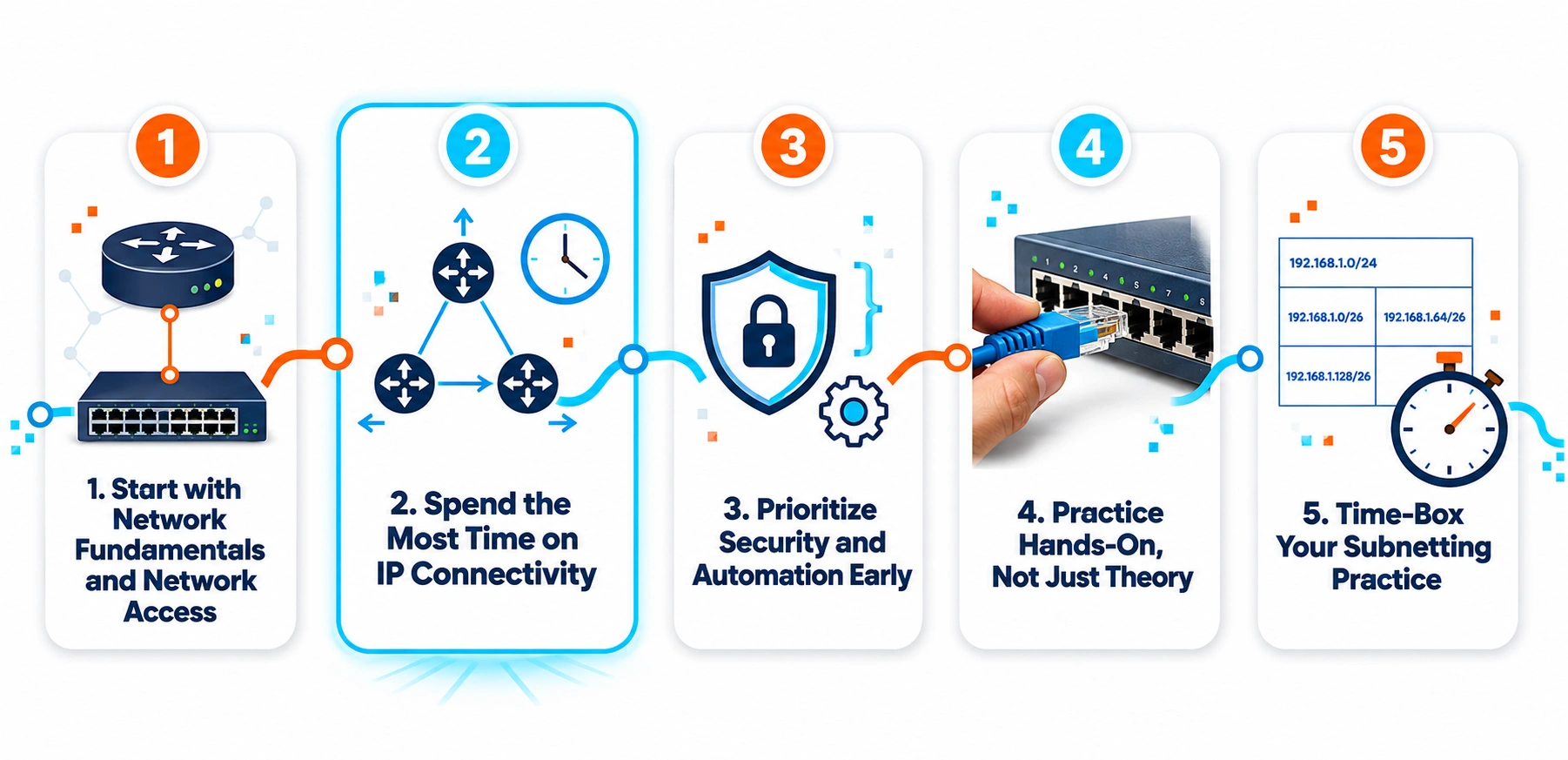
Once you have the domain breakdown, building an efficient study plan is straightforward:
- Start with Network Fundamentals and Network Access (40% combined) - they form the conceptual base everything else depends on.
- Spend the most time on IP Connectivity - at 25%, it's worth dedicating a standalone block of weeks to routing and OSPF specifically, not folding it into general revision.
- Don't leave Security and Automation for the final week - together they're 25% of the exam, the same weight as IP Connectivity alone, yet candidates consistently under-allocate time to them because they "feel optional."
- Practice hands-on, not just theory. A large share of CCNA 200-301 questions are configure-and-verify or simulation-based - VLANs, trunking, static and OSPF routing, NAT, and ACLs are commonly tested through simulated CLI tasks, not just multiple choice.
- Time-box your subnetting practice until it's reflexive. It's the one skill that quietly determines your speed across three different domains.
A realistic full-time study timeline runs 8–12 weeks; working professionals studying part-time typically need 12–16 weeks to comfortably cover all six domains with lab practice included.
What's New in the CCNA 200-301 Blueprint for 2026
If you're studying in 2026, you're preparing for blueprint version 1.1, released in August 2024 and valid through early February 2027. It kept the same six-domain structure and weightage as the original 200-301 launch but modernised the content inside several domains - most notably by:
- Expanding Automation and Programmability with deeper controller-based networking and cloud management concepts
- Adding awareness-level coverage of generative AI and machine learning in the context of network operations
- Strengthening Security Fundamentals with updated Layer 2 attack and mitigation content
- Reinforcing Spanning Tree Protocol and switching security topics within Network Access
The exam number (200-301) hasn't changed, so if you see study material referencing "CCNA 200-301," confirm it's aligned to the current v1.1 objectives rather than the original 2020 blueprint - a surprising amount of outdated content is still circulating online.
How Our CCNA Course in Noida Covers This Exact Syllabus
At SiliconUniv, our CCNA training in Noida is built module-by-module around this current 200-301 v1.1 blueprint - not a generic networking curriculum retrofitted to fit Cisco's exam. Every domain above maps directly to a dedicated module in our course, with hands-on lab time weighted the same way Cisco weights the exam: the heaviest focus goes to IP Connectivity and Network Access, exactly where most candidates lose marks.
You get Cisco-certified trainers, real router and switch practice (not just simulators), 24×7 lab access at our Noida and Karol Bagh centres, and structured exam preparation aligned to whichever version of the blueprint is currently live. Whether you're a complete beginner or already have hands-on IT experience, the course is designed to take you from Domain 1 through Domain 6 with enough practical repetition to walk into the exam center confident rather than just familiar.